


The Mid-Year Check (also known as an Interim Review) workflow includes TWO TASKS.
1. Log in to ePerformance.
2. Select My Employees’ Reviews in the left menu.

3. Select Mid-Year, or Self Appraisals in left menu.
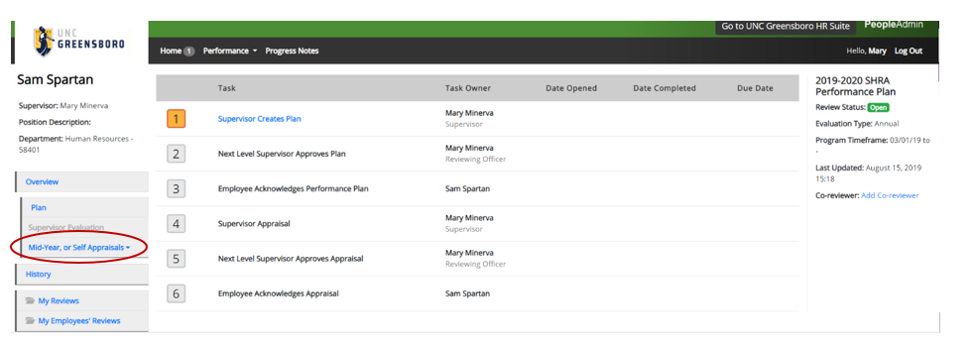
4. Using the drop down menu, click Invite Select the person who will complete the Mid-Year, or Self Appraisal.
5. Select your name as the supervisor to place the action into your queue, then click Save.

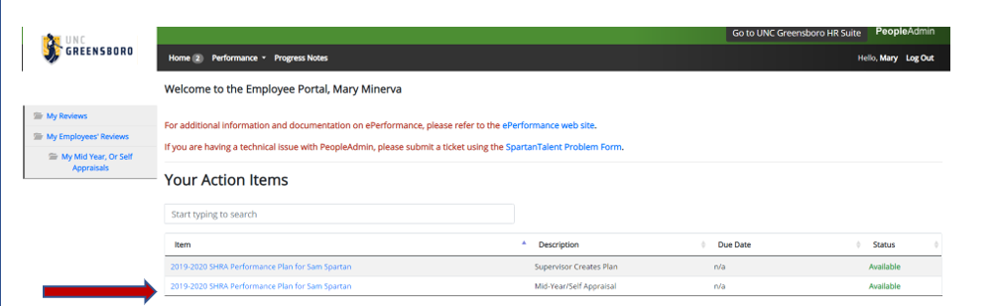
6. Return Home and open the Mid-Year in Your Action Items.
7. Use the Review Type drop down to select Mid-Year.
8. Type your review in the Comments.
9. Use Attachments to add any documentation.
10. Click Complete.
NOTE: This review is NOT WEIGHTED in the end of year final appraisal.

REMOVE MID-YEAR REVIEW
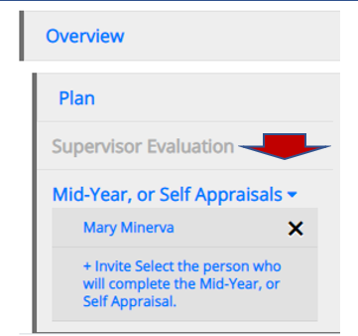
If you wish to remove the Mid-Year or Self Appraisal task, it must be done prior to saving any information in the Comments field. Once you hit ‘Complete’ it cannot be undone or edited.
Select the X next to the reviewer’s name in the left menu to remove the task from the queue. This will allow you to assign a different reviewer or remove the task altogether.
Once you have had the Mid-Year Check-In meeting:
1. Log in to ePerformance.
2. Click on the Item in your Action Items.

3. In the Actions drop down, click Acknowledge. The next task in the appraisal process will go to your immediate supervisor.
There is an optional self appraisal tab.
